
Agentic Website Experience: Your Site as an AI-Powered Lead Engine
Most websites show every visitor the same page, the same form, the same pitch. An agentic website experience fixes that — AI agents that read signals, adapt in real time, and convert each visitor based on who they actually are.
What is an agentic website experience?
This page explains what an agentic website experience is: a dynamic layer where AI agents read visitor signals and adapt in real time to guide each visitor toward a relevant outcome. It covers the five intent signal categories that power it and how to deploy one without code.
Most websites are static by design. Every visitor lands on the same page, sees the same content, and faces the same form. The conversion problem isn't traffic — it's that static pages can't respond to the individual in front of them. An agentic website experience replaces this fixed structure with a dynamic layer: AI agents that read visitor signals, personalize the interaction in real time, and guide each person toward a relevant outcome.
This page covers the core components, the five intent signal categories that power real-time personalization, the highest-impact deployment use cases, and the practical path to building your first agentic experience — without engineering resources.
1. What is an agentic website experience?
Defining the agentic website experience
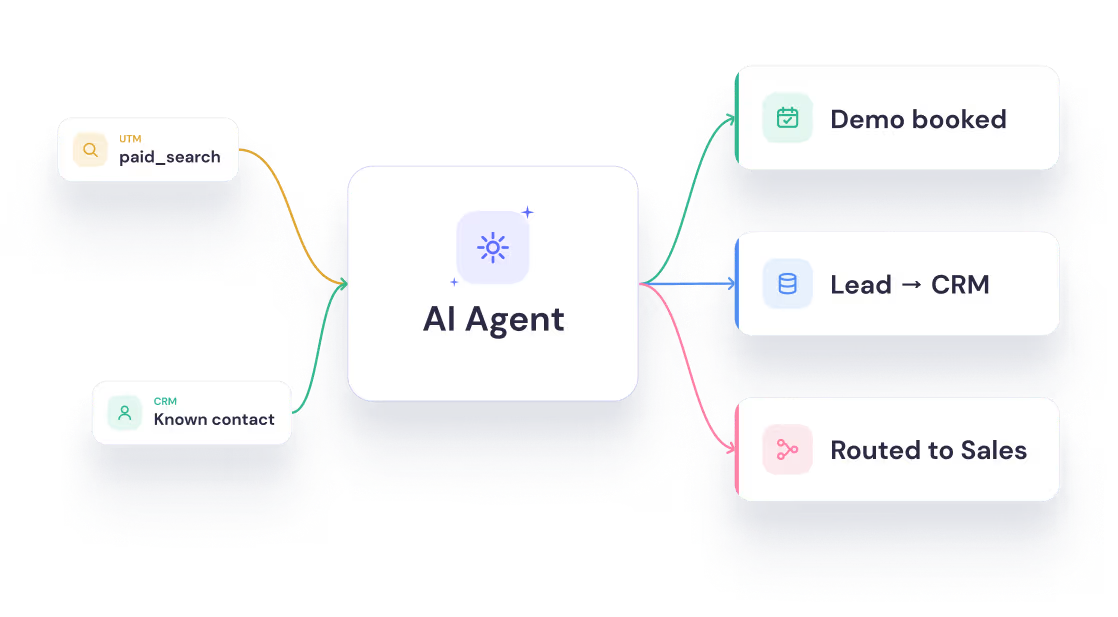
An agentic website experience is a dynamic website interaction layer where AI agents autonomously read visitor signals, adapt conversation flows in real time, and guide each visitor toward a relevant outcome — qualification, booking, purchase, or support resolution — without requiring a human to manage the interaction.
The word "agentic" comes from agentic AI: AI systems that don't just respond to inputs but actively pursue goals across multiple steps, using reasoning, memory, and tool integrations to produce outcomes. Applied to the website, this means moving from a passive content layer (the visitor navigates static pages) to an active acquisition engine (the AI agent engages the visitor, qualifies them, and routes them forward).
What makes an experience "agentic"?
The distinction between a standard website widget and a true agentic website experience comes down to three core properties:
Property 1: Goal-directedness. A static form collects data. An AI agent pursues an outcome. The agent's job is not to display information but to qualify the visitor, answer their question, and route them to the next step — all within a single interaction.
Property 2: Adaptability. A static page shows the same content to every visitor. An agentic layer adapts based on visitor data: traffic source, UTM parameters, firmographic context, scroll depth, CRM membership, or in-session behaviour. The result is a personalized interaction that feels relevant to the individual.
Property 3: Autonomy. The agent makes decisions within a defined scope without human intervention. Qualification logic, routing rules, and escalation thresholds are all pre-configured — the agent executes them automatically, at scale, around the clock.
For a deeper look at the underlying architecture — how AI agents use memory, LLM reasoning, and tool integrations to achieve this — see AI Agent Foundations.
2. From static pages to agentic experiences
Why static websites have a conversion ceiling
The average B2B website converts between 1–3% of visitors into leads. The remaining 97% exits without any interaction, qualification, or handoff. The problem isn't traffic quality — paid and organic channels often deliver well-targeted audiences. The problem is that static pages treat a high-intent enterprise buyer identically to someone who accidentally landed on the page.
Static forms compound the problem: they appear at the same point in the journey for every visitor, require manual completion, and cannot dynamically adjust based on what the visitor already told you in a previous visit, an ad interaction, or a CRM record. These aren't isolated friction points — they're part of the structural lead generation problems that compound across the whole funnel.
The four stages of website evolution
The way websites handle visitors has evolved through four distinct stages, each solving a limitation of the one before it. Here's where each stage fails, and why Stage 4 is a different category entirely.
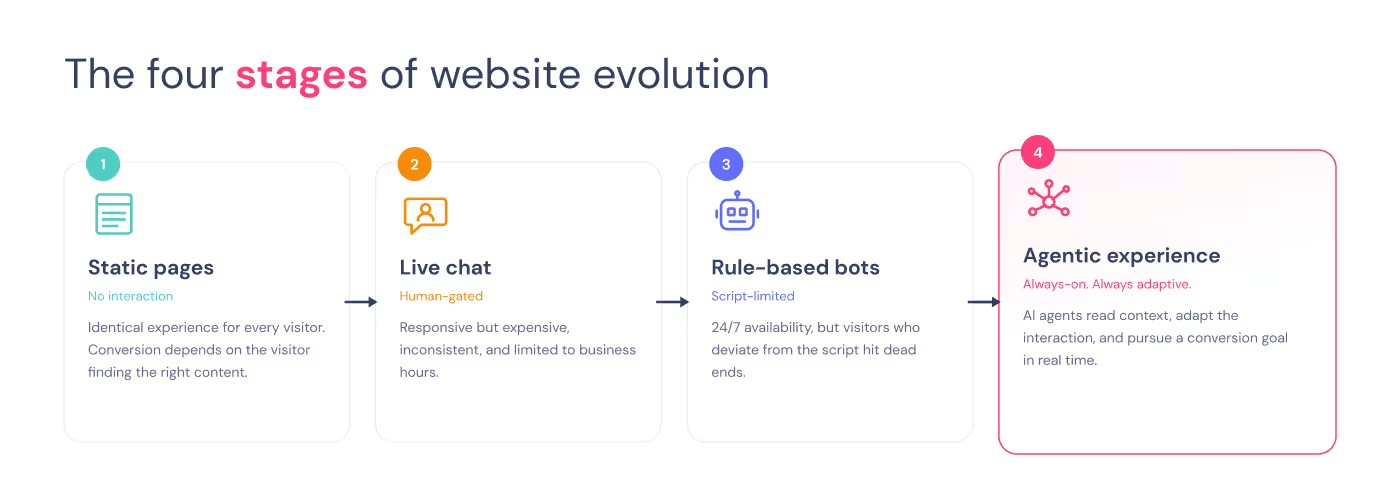
Stage 1: Static pages — Identical experience for all visitors. No interaction. Conversion depends entirely on the visitor reading the right content and voluntarily filling a form.
Stage 2: Live chat — Human availability creates responsiveness, but it's expensive, inconsistent, and doesn't scale beyond business hours. Conversion is gated by a human being online.
Stage 3: Rule-based bots — Scripted flows offer 24/7 availability, but cannot handle variation outside the script. Visitors who deviate from the expected path hit dead ends.
Stage 4: Agentic experience — AI agents read context, adapt the interaction, pursue a defined conversion goal, and integrate with the full downstream stack in real time. Conversion is no longer gated by human availability or script rigidity.
The shift from Stage 3 to Stage 4 is not an incremental improvement. It's a fundamentally different operating model for the website — one where the site actively works toward a conversion outcome rather than waiting for the visitor to find their own way there.
The framework behind Stage 4 websites: how AI agents engage visitors, qualify intent, and route leads in real time.
Read the guide3. The components of an agentic website
What an agentic website is built on
An agentic website combines three technical layers that work in sequence. Understanding how they connect is what separates a working deployment from a poorly integrated one.
Layer 1: The signal layer. The signal layer reads incoming visitor data before the AI agent engages. This includes UTM parameters, referral source, device type, geographic location, time on page, scroll depth, CRM membership status, and any first-party data available from your marketing stack. The signal layer determines which experience the visitor enters — before they've typed a single word.
Layer 2: The agent layer. The agent layer is the AI model executing the conversation flow. It receives the visitor's context from the signal layer, follows a defined qualification goal, and uses LLM reasoning to handle natural language variation within the conversation scope. The agent pursues its goal across multiple conversational turns — asking the right questions, adapting based on answers, and deciding how to route the visitor at the end.
Layer 3: The action layer. The action layer handles everything downstream from the conversation: writing leads to the CRM, triggering calendar integrations for bookings, firing Slack or email notifications, updating contact properties, and routing qualified leads to the right sales owner. The visitor experiences a seamless conversation; behind the scenes, a series of integrations execute automatically.
A production-grade agentic website operates all three layers simultaneously, without human intervention. If any layer is missing — signal inputs are ignored, the agent flow isn't connected to the CRM, or routing logic is missing — the experience degrades toward a rule-based bot.
4. Visitor intent signals and real-time personalisation
What are visitor intent signals?
Visitor intent signals are data points generated by a website visitor before and during their session that indicate their goal, context, and likelihood to convert. In an agentic website experience, the AI agent consumes these signals to personalize the interaction in real time — adjusting the opening message, qualification questions, offer framing, and routing path based on who the visitor is and what they came for.
The practical effect: visitors who receive a personalized interaction are more likely to complete the qualification flow, provide accurate information, and convert — because the experience feels relevant to their specific situation rather than generic.
The five visitor intent signal categories
Every visitor who lands on your site is already telling you something — before they type a single word. Agentic experiences read five categories of signals to decide how to open the conversation, what to ask, and where to route the visitor. Here's what each one tells the agent, and how to use it.
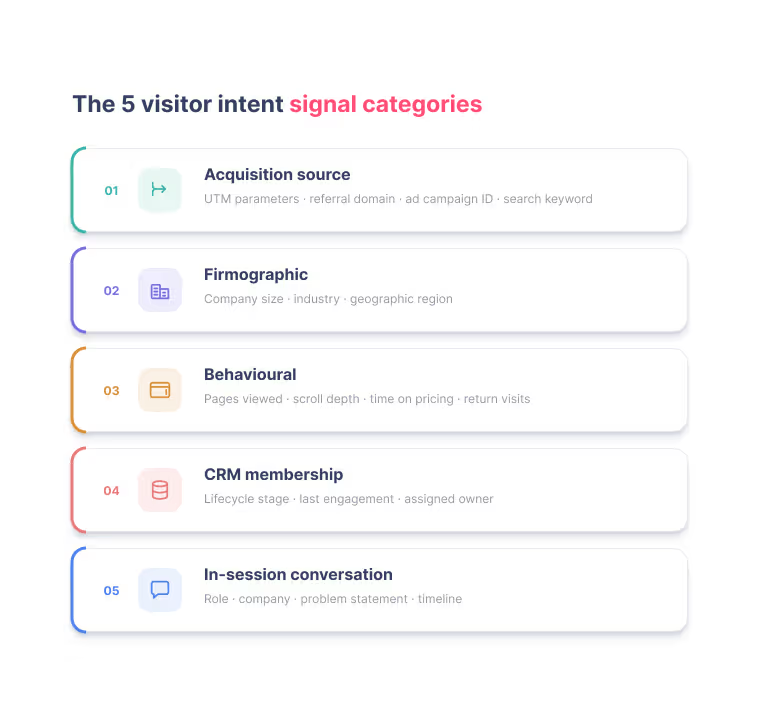
Signal category 1: Acquisition source signals. UTM parameters, referral domain, ad campaign ID, and search keyword. These tell the agent where the visitor came from and what problem they were trying to solve when they found you. A visitor arriving from a Google Ads campaign for "lead generation automation" signals different intent than one arriving from a LinkedIn article about marketing ops. Use source signals to set the agent's opening message and to calibrate the qualification path.
Signal category 2: Firmographic signals. Company size, industry, and geographic region — inferred from IP-based company resolution tools or enriched from your CRM. A visitor from a 50-person SaaS company requires a different qualification conversation than a visitor from a 5,000-person enterprise. Firmographic signals let the agent skip irrelevant questions and ask only what it doesn't already know.
Signal category 3: Behavioural signals. Pages viewed in the current session, scroll depth on high-intent pages, time spent on the pricing page, and return visit count. High scroll depth on the pricing page combined with a return visit is a strong intent signal that changes how the agent opens the conversation — and what offer it routes the visitor toward.
Signal category 4: CRM membership signals. Whether the visitor is already in your CRM, their current lifecycle stage, last engagement date, and assigned owner. A visitor who is already an open opportunity in Salesforce should receive a different conversation than a cold first-time visitor. CRM signals prevent redundant qualification of contacts who are already mid-funnel and allow the agent to pick up where the previous touchpoint left off.
Signal category 5: In-session conversation signals. What the visitor says during the conversation itself — their role, their company, their problem statement, their timeline. The agent uses these signals progressively to refine its qualification score and adapt its next question. A visitor who says "we have a sales team of 15 people" is giving the agent a firmographic data point that changes every subsequent routing decision.
The personalization response model
When the agent receives a visitor's signal set, it selects an experience variant and adjusts three elements:
- Opening message — Contextualized to the source signal. A visitor arriving from a guide on lead qualification gets: "I see you came from our lead qualification guide — are you looking to set this up for your team?" Not: "Hi! How can I help you today?"
- Qualification path — The questions the agent asks depend on what it already knows. A visitor matched to a CRM record with company_size = 80 skips entry-level firmographic questions and goes straight to use-case specifics.
- Routing outcome — The combination of firmographic fit, behavioural intent, and in-session score determines whether the visitor is routed to a sales call, a trial, a resource, or a nurture sequence.
Pro tip: The two signal categories that deliver the highest personalization lift, fastest, are acquisition source and CRM membership combined. When you know where a visitor came from and that they're already in your database, the agent can skip all firmographic qualification and go straight to intent. Implement these two signal layers in your first deployment — before adding firmographic enrichment or behavioural scoring.
Qualify and route every visitor in real time.
Build your first agent.svg)
Free plan available
No credit card required
Setup in minutes
5. Agentic website experience use cases
Where to deploy an agentic website experience
The agentic website experience isn't limited to a single page or a single visitor type. The following execution patterns cover the highest-impact deployment scenarios for B2B SaaS and services companies.
Use case 1: High-intent homepage qualification
Business outcome: Qualify homepage visitors with high purchase intent before they bounce — converting them into booked demos or trials within the same session, without a form.
Execution pattern:
- Trigger: Visitor arrives with utm_source = paid_search OR scroll depth > 60% on the hero section
- Agent opening: Personalized to acquisition source, skips generic welcome
- Qualification: Four questions covering role, company size, primary use case, and timeline
- ICP match: role = marketing_ops OR growth AND company_size >= 20 AND timeline <= 30 days → routes to calendar booking
- Non-ICP path: Routes to the most relevant use case page or case study based on stated problem
Design constraints that matter:
- Keep qualification to four questions maximum — completion rate drops sharply above five
- Calendar integration must fire within the same session; delayed follow-up reduces show rates significantly
- The agent must handle "I'm just browsing" gracefully — route to a resource, don't terminate
Use case 2: Pricing page intent capture
Business outcome: Convert pricing page visitors who are actively evaluating but haven't yet committed — the highest-intent cohort on the site.
Execution pattern:
- Trigger: Visitor spends > 45 seconds on the pricing page OR scrolls past the enterprise pricing tier
- Agent opening: "Trying to figure out which plan fits your team?" — names the obvious question and removes the friction of starting the conversation
- Qualification: Plan comparison assistance based on team size and use case
- ICP routing: Routes to free trial for self-serve ICP; routes to sales call for enterprise signals (company_size > 200 OR explicit mention of team size > 50)
- Exit path: Offers a plan comparison resource if the visitor isn't ready to decide
Design constraints that matter:
- The agent should resolve the pricing question within the conversation — not simply redirect to a contact form
- For enterprise-signal visitors, the handoff to a sales owner should happen immediately, not via an email queue
- Never ask for email before providing value — qualify first, capture contact after the visitor has received something useful
Use case 3: Return visitor re-engagement
Business outcome: Re-engage return visitors who have shown intent across multiple sessions but not converted — using CRM data to deliver a contextually relevant message that picks up where the last interaction left off.
Execution pattern:
- Trigger: Visitor has visit_count >= 2 AND is matched to an open CRM contact record
- Agent: Greets by first name (where CRM data is available) and references the previous visit or content interaction
- Personalization: Opens with their last known interest — "Last time you were looking at our lead qualification flows — did any questions come up since?"
- Routing: Offers a direct path to the next logical step in their buying journey, based on lifecycle stage
Design constraints that matter:
- CRM matching must happen silently — the visitor should experience relevance, not surveillance
- If CRM data is incomplete, fall back gracefully to a standard qualification flow without exposing the mismatch
- The agent's framing should feel like a helpful follow-up, not a sales chaser
6. How to build your agentic website experience
Building your agentic website experience
The path from a static website to a live agentic experience follows five phases. Each phase is achievable without engineering resources. For example, Landbot's no-code builder handles signal consumption, conversation logic, LLM integration, and downstream actions in a single visual environment.
Step 1 — Define your primary conversion goal
Before configuring a single flow, answer: what is the one outcome this agent must produce? A homepage agent optimized for demo bookings requires different qualification logic than one optimized for trial signups. The goal determines the qualification questions, the routing rules, and the primary success metric you'll track.
Common primary goals for B2B agentic website experiences:
- Demo or sales call booked (calendar integration required)
- Trial account created (form-free signup flow)
- Qualified lead written to CRM (HubSpot or Salesforce integration)
- Support ticket deflected to self-service (knowledge base integration)
Landing pages aren't one-size-fits-all. A demo request page, a PPC page, a trial signup: each one has different priorities. Interactive Landing Pages: How to Migrate from Static to Agentic breaks down which to tackle first, plus the four decisions to settle before you build — goal, qualification signals, conversation arc, routing outcomes.
Step 2 — Map your intent signal inputs
Identify which signal categories you have available today. Start with acquisition source (UTM parameters are available immediately with no integration required) and CRM membership (requires a HubSpot or Salesforce connection but delivers the highest personalisation lift). Add firmographic enrichment and behavioural scoring in a second phase, once the core flow is validated and performing.
Step 3 — Design your qualification logic
Define your ICP scoring model as a set of Boolean conditions the agent evaluates in sequence:
IF role IN [marketing_manager, growth_ops, marketing_ops, digital_ops]
AND company_size >= 20
AND industry IN [software, fintech, services, real_estate, edtech]
THEN → qualified → route to booking or trial
ELSE IF intent_signals >= medium_threshold
THEN → borderline → route to resource or case study
ELSE → not qualified → route to nurture sequence
Name your conditions explicitly — it makes the flow easier to iterate in production. "ICP_match" and "borderline_intent" as named states are faster to debug and update than anonymous branching in the builder canvas.
Step 4 — Configure your agent flow
This is often how it works: an LLM block handles natural language variation within each step and then conditional branches handle routing outcomes.
With Landbot, a single AI Agent block handles the full qualification flow and routes the lead directly to an outcome — signup, demo booking, or disqualification — no complex logic trees needed.
The full first version — signal inputs, qualification questions, ICP logic, and CRM write — is typically achievable within hours.
Step 5 — Connect your downstream systems
An agentic experience without downstream integrations captures conversation data but doesn't act on it. Connect at a minimum:
- CRM (HubSpot or Salesforce): Write qualified leads, update contact properties, trigger owner assignments
- Calendar (Calendly): Enable in-session booking without requiring the visitor to leave the conversation
- Notifications (Slack, email): Alert the relevant sales owner the moment a high-intent visitor qualifies
- Analytics: Instrument completion rate, conversion rate, and drop-off by step from day one
For integration patterns — how Landbot connects with CRMs, calendars, analytics platforms, and internal tools — check our integrations page!
Explore integrations7. Measuring performance: key metrics
How to measure an agentic website experience
An agentic website experience operates differently from a static form, and it needs a different measurement framework. The following KPIs are the metrics that determine whether your agentic experience is working — and where to improve it when it isn't.
The agentic website experience improvement cycle
The agentic website experience is not a set-and-forget deployment. A two-week improvement cadence is the right operational rhythm:
Week 1 — Measure: Pull completion rate, drop-off by step, ICP qualification rate, and session-to-outcome rate. Note which acquisition sources are producing the most qualified completions.
Week 2 — Iterate: Redesign the step with the highest drop-off. Adjust ICP thresholds based on sales team feedback on lead quality. Test one alternative opening message variant against the current control for the highest-traffic source.
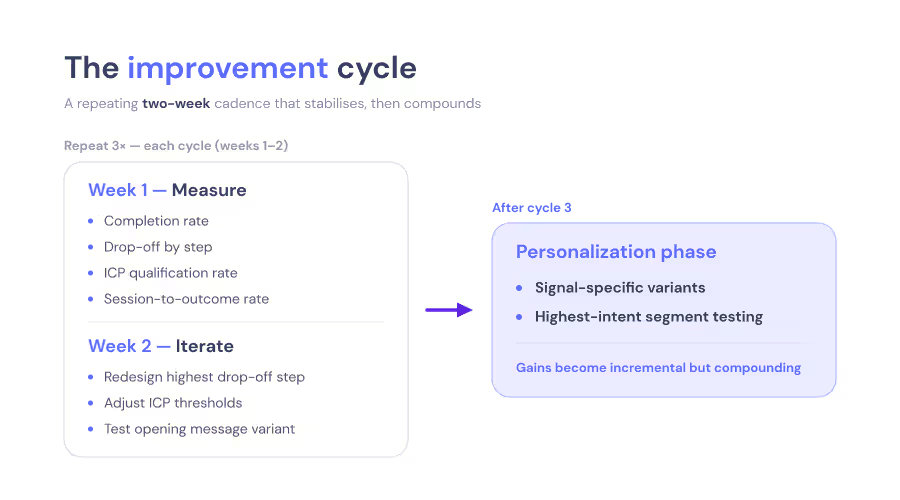
After three cycles, the core flow stabilises and iteration shifts to personalization — testing signal-specific experience variants for your top acquisition sources and highest-intent visitor segments. The gains from the first three cycles are typically structural (flow length, question order, routing logic); the gains from subsequent cycles are incremental but compounding.
Stop collecting leads. Start qualifying them as they arrive.
Start nowFree plan available
No credit card required
Setup in minutes
8. FAQs
FAQs about agentic website experiences
An agentic website experience is a dynamic interaction layer where AI agents read visitor signals, adapt conversations in real time, and guide each visitor toward a relevant conversion outcome — qualification, booking, or support resolution — without human involvement. Unlike static pages or scripted bots, agentic experiences pursue a defined goal autonomously, adjusting based on who the visitor is and what they came for.
Agentic AI refers to AI systems that autonomously pursue multi-step goals using reasoning, memory, and tool integrations — rather than responding to a single input. On a website, an agentic AI system engages visitors, qualifies them through a structured conversation, executes downstream actions (CRM updates, calendar bookings, notifications), and adapts based on real-time signals — without human oversight at the individual conversation level.
A rule-based bot follows a fixed script and fails when the visitor deviates from the expected path. An agentic website experience uses an AI agent that can handle natural language variation, read contextual signals, make qualification decisions across multiple conversation turns, and execute multi-step downstream actions.
Agentic website experiences consume five categories of visitor signals: acquisition source (UTM parameters, referral domain), firmographic data (company size, industry, location), behavioural data (pages viewed, scroll depth, return visits), CRM membership status (existing contact, lifecycle stage, assigned owner), and in-session conversation data (role, stated problem, timeline).
Standard marketing automation follows fixed if-then rules: if the visitor clicks X, send email Y. Agentic AI operates with goal-directedness and adaptability — the agent decides how to reach its goal (qualifying the visitor) based on real-time context, handling variation and uncertainty rather than a predetermined decision tree. The practical difference is that agentic systems handle the edge cases that break rule-based workflows, without requiring a new rule for every possible path.
A first working version — with signal inputs, qualification logic, and CRM integration — typically takes a few hoursto configure in a no-code platform like Landbot. The most time-consuming step is defining the qualification criteria and ICP scoring model before building begins. Once deployed, the two-week improvement cycle produces meaningful gains within the first month.
The minimum viable stack is: (1) a CRM (HubSpot or Salesforce) to capture and enrich leads, and (2) a calendar tool (Calendly) if demo booking is a primary goal. Slack and email notifications are the next priority for immediate sales team alerting. Firmographic enrichment tools can be added in a second phase to improve personalisation on cold traffic.
Yes — and this is the most common first deployment. A qualification flow captures the same lead data as a static form, with higher completion rates (because the interaction is conversational) and higher lead quality (because the ICP scoring logic qualifies as it captures).
A production-grade agentic experience includes explicit escalation paths: if the agent cannot qualify or resolve within a defined turn limit, it routes the visitor to a human via live chat handoff, a booking link, or email capture for follow-up. The escalation trigger, handoff message, and routing destination are all configurable. The agent never terminates a conversation without offering a clear next step.
Landbot is an AI agent platform for website conversion. It provides the no-code builder, LLM integration, signal consumption, qualification logic, and full-stack downstream integrations needed to deploy an agentic website experience without engineering resources. The platform processes 100M+ conversation events monthly, giving Landbot 10 years of conversion data to inform the design patterns it supports.
Your website already has the traffic. Build the experience that converts it.
Landbot gives you the AI agent platform, qualification logic, and CRM integrations to deploy your first agentic website experience — without writing a line of code.
Free plan available
No credit card required
Setup in minutes