
WhatsApp for Business: The AI Agent & Automation Playbook
Most businesses use WhatsApp chatbots to send messages. The ones generating pipeline use AI agents to qualify leads, answer questions, and route high-intent contacts automatically.
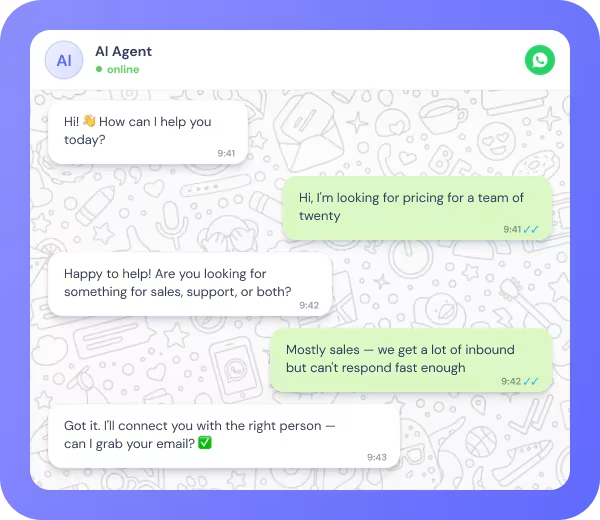
How do you automate WhatsApp for business?
This guide covers how to build a WhatsApp automation system: from API access and AI agent setup to compliance, use cases, and platform selection.
WhatsApp has over 2 billion active users and open rates above 90% — consistently higher than any other business messaging channel, including email. For B2B teams, that gap is not a marketing talking point. It is a structural advantage. The businesses extracting real pipeline from WhatsApp are not just sending broadcasts. They are running AI agents that qualify leads, resolve support queries, and route high-intent contacts automatically, around the clock.
1. What is WhatsApp business automation?
The definition
WhatsApp business automation is the use of the WhatsApp Business Platform (API) to send, receive, and respond to messages automatically — through pre-built flows, AI agents, and integrations — without requiring a human to manage each conversation in real time.
The full scope runs from simple notification sequences (order confirmations, appointment reminders) to goal-directed AI agents that qualify leads, answer product questions, route support tickets, and escalate to humans when the situation requires it.
What makes it different from standard messaging
Managing WhatsApp manually has a ceiling. Automation removes it on three dimensions:
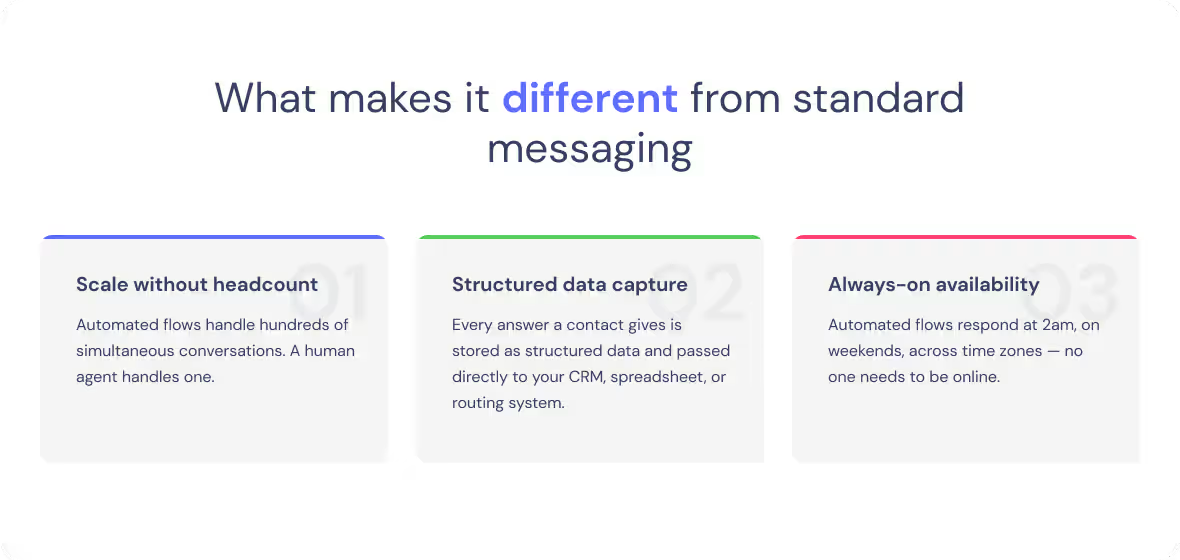
Pattern 1: Scale without headcount. Automated flows handle hundreds of simultaneous conversations. A human agent handles one. Automation removes the headcount limitation from your messaging capacity without adding to your team
Pattern 2: Structured data capture. Every field a contact answers — company size, intent, product interest, urgency — is stored as a data object and passed downstream to CRMs, spreadsheets, and routing systems. Manual conversations rarely produce structured, actionable data.
Pattern 3: Always-on availability. Automated flows and AI agents or chatbots respond at 2am, on weekends, across time zones. For marketing managers running paid campaigns around the clock, this matters directly: leads that arrive outside business hours — often the majority of inbound from international traffic or after-hours ad spend — are qualified and routed without anyone needing to be online. Response speed is one of the most consistent predictors of lead conversion; automation closes that gap entirely.
Why WhatsApp matters for B2B teams
Email open rates hover around 28.6% — while WhatsApp consistently lands somewhere between 85% and 98%. That's not a marginal improvement; it's a completely different conversion environment... B2B buyers check WhatsApp throughout the day on the same device they use for personal communication. Messages land in a channel they trust, respond to quickly, and do not filter into a promotions tab.
WhatsApp is also asynchronous by design. A prospect can pick up a qualification conversation at a time that suits them, without a live agent on the other end. For B2B teams with global audiences or limited sales headcount, this is a genuine structural advantage: you can run qualification, nurturing, and support conversations at scale without needing a 24/7 team.
Adoption is highest in Europe, LATAM, the Middle East, and Southeast Asia — regions where WhatsApp is the primary business communication channel, not a secondary one. For SaaS and services companies with buyers in these regions, being absent from WhatsApp is the equivalent of not having a website.
For a closer look at how Landbot handles WhatsApp API access, flow building, and campaign management — see Landbot for WhatsApp.
2. WhatsApp Business API vs. WhatsApp Business App
Two products, two different scales
Meta offers two separate products for businesses: the WhatsApp Business App (a free mobile app built for small businesses) and the WhatsApp Business Platform — commonly called the WhatsApp Business API — designed for medium and large businesses running automated, high-volume communication.
The distinction matters because most automation capabilities — AI agents, CRM integrations, broadcast campaigns, and custom flows — require the API. The app covers basic features only: quick replies, greeting messages, away messages, and broadcast lists capped at 256 contacts per list, per WhatsApp's official documentation.
When to move from App to API
Most businesses don't move from the WhatsApp Business App to the API because they want more features. They move because the App stops working at the scale they're operating at.
The signals are operational: response times are slipping because one person cannot keep up with volume; leads are going cold because no one is online when they message; conversation data is being manually re-entered into the CRM; campaigns need to reach more than 256 contacts.
Every day you run lead generation through the Business App is a day you are paying for traffic and losing contacts to slow response times and no automation. The API is not a feature upgrade. It is the infrastructure that makes the channel worth investing in.
Build your first WhatsApp AI agent — without code.
Start for free.svg)
Free plan available
No credit card required
Setup in minutes
3. WhatsApp AI agents: The new standard for business automation
What is a WhatsApp AI agent?
A WhatsApp AI agent is a goal-directed system that autonomously manages conversations on the WhatsApp channel — qualifying leads, answering support queries, routing contacts, and completing structured tasks — by combining AI reasoning with pre-defined workflow logic, without requiring a human to intervene at each step.
The operational difference from a rule-based WhatsApp chatbot matters in practice. A rule-based bot follows a fixed decision tree: if the user selects button A, go to node A1. If they type a free-text response that was not scripted — a question, an off-menu answer, an ambiguous reply — the conversation breaks. The lead hits a dead end, disengages, and is lost. A WhatsApp AI agent handles that deviation: it asks a clarifying question, re-routes the conversation, or escalates to a human with context. No dead ends, no silent failures.
Here's what changes when you move from a rule-based bot to an AI agent:
What changes when you replace rule-based bots with AI
The practical benefit of a WhatsApp AI agent over a rule-based bot is not sophistication for its own sake. It is completion rate. A rule-based bot completes its flow only when users follow the exact path you scripted. An AI agent completes its objective even when the conversation takes an unexpected turn — which, in real-world lead generation and support, is most of the time.
For a lead generation flow, the objective is a complete lead object: a set of populated fields (intent, company size, use case, urgency, contact details) that your CRM and routing logic can act on. The AI agent collects those fields through conversation, adapts when answers are partial or ambiguous, and only advances the workflow when the required data is confirmed. The result is higher completion rates, cleaner CRM data, and more leads reaching the right team — without the engineering overhead of scripting every possible conversation path.
For a support flow, the benefit is the same: higher resolution rates on the first interaction, fewer escalations that arrive without context, and a full conversation transcript when a human agent does need to step in.
For a deeper look at how AI agents use memory, LLM reasoning, and tool integrations to achieve this — see AI Agent Foundations
Pro tip: Define the output object before you configure the agent instructions. What specific fields does your CRM or routing system need? Build the agent to collect exactly those fields, in the right sequence, with fallback paths for partial completions. Teams that skip this step end up with well-intentioned conversations that produce incomplete data downstream.
4. Use cases for WhatsApp Business Automation
WhatsApp operates across the full revenue cycle — not just as an inbound capture channel, but as the thread connecting lead qualification, support, campaigns, and sales follow-up. The following execution patterns cover the highest-impact automations for B2B and customer-facing teams.
Lead qualification and appointment booking
Business outcome: Qualify inbound leads before they disengage — routing ICP-matched contacts to a booked appointment within the same conversation, without manual triage..
Execution pattern:
• Trigger: Contact clicks a Click-to-WhatsApp ad or scans a QR code.
• Agent action: Opens qualification sequence — collects use case, company size, urgency, and contact info in a natural conversational flow.
• Decision: Scores the lead against ICP criteria (e.g. company size ≥ 50 employees, budget confirmed, decision-maker identified).
• Output: Qualified leads are routed to a calendar booking flow. Unqualified leads enter a nurture sequence automatically.
Design constraints that matter:
- Keep qualification to four questions maximum — WhatsApp conversations that feel like forms get abandoned
- Calendar booking must fire within the same session — follow-up links sent later lose the momentum of an already-engaged contact
- Unqualified contacts must land somewhere useful — a nurture sequence, not a dead end
For practical lead qualification frameworks — from intent detection and ICP scoring to appointment booking and lead routing — see the AI agent for lead generation guide.
Customer support automation
Business outcome: Resolve tier-1 support volume without human intervention — and escalate everything else with full context, so agents close tickets faster without re-asking.
Execution pattern:
• Trigger: Customer sends an inbound message to the business WhatsApp number.
• Agent action: Identifies intent — support query, status check, or escalation request. Answers or resolves if within knowledge base scope.
• Decision: If unresolvable, collects ticket context (issue type, order ID, preferred resolution) and routes to the human support queue with a full transcript.
• Output: Resolved ticket or structured escalation. SLA data logged automatically to your support platform.
Design constraints
- The transcript must travel with the escalation — the human agent should never need to ask the customer to repeat context
- Escalation should be triggered by unresolvable intent, not by keywords — keyword-based routing misfires on anything slightly out of pattern
- SLA logging must be automatic — if the agent resolves without a human, that resolution still needs to appear in your support platform
Broadcast campaigns and lead nurturing
Business outcome: Turn one-way campaign messages into two-way qualification conversations — generating segmented pipeline from a single broadcast send, without manual follow-up per contact.
Execution pattern:
• Trigger: Scheduled broadcast sends an approved template message to a segmented opted-in list (e.g. trial users who have not converted, leads who attended a webinar).
• Agent action: Responds to replies by identifying interest level and asking one qualifying question (e.g. “Are you evaluating tools for your team right now?”).
• Decision: Engaged contacts (positive reply + qualification confirmed) are routed to a booking flow or sales notification. Non-responders enter a follow-up sequence.
• Output: Segmented pipeline from a single broadcast send — without manual follow-up per contact.
Design constraints:
- All outbound messages must use pre-approved Meta templates — free-form outbound messaging to opted-in lists is not permitted
- Contacts must have actively opted in — passive imports do not qualify under WhatsApp Business Policy
- One qualifying question maximum in the reply flow — broadcasts that open into a full qualification sequence lose the conversational feel that makes WhatsApp work
B2B sales nurturing and follow-up
Business outcome: Keep mid- and bottom-funnel deals moving without a sales rep manually chasing — automating proposal follow-ups, post-demo check-ins, and renewal conversations triggered directly by CRM events.
Execution pattern:
• Trigger: CRM event fires — deal stage change, proposal sent, no response after 72 hours, or upcoming renewal date.
• Agent action: Sends a personalised template message (e.g. “Hey [Name], following up on the proposal we sent — any questions before you review it?”) and opens a conversational follow-up.
• Decision: If prospect replies with a question, the AI agent answers from the knowledge base. If they confirm interest, routes to calendar booking. If they decline, marks the deal stage in CRM and stops the sequence.
• Output: Updated CRM deal stage, booked meeting, or clean disqualification — all without a sales rep manually chasing.
Design constraints:
- Triggers must fire from CRM events, not fixed timers — timing tied to deal context outperforms generic drip cadences
- The agent must handle objections from the knowledge base — human handoff is for buying signals, not every question
- If the prospect declines, the sequence stops and the CRM updates automatically — no rep intervention needed to close the loop
Start building your Whatsapp automation flow today.
Build your first AI AgentFree plan available
No credit card required
Setup in minutes
5. Compliance, Opt-Ins, and Message Templates
Why compliance is not optional on WhatsApp
WhatsApp's compliance requirements are stricter than email marketing's — and Meta enforces them actively. Accounts that violate opt-in rules, send unsolicited messages, or use the API for prohibited content face messaging limit reductions or outright suspension.
For a B2B team, an account suspension does not just pause one campaign. It removes the entire WhatsApp channel — a channel that took weeks to set up and build a contact list on. There is no emergency bypass. Rebuilding from suspension takes time you cannot afford in the middle of a live campaign cycle. Getting compliance right from the start is the only viable approach.
The opt-in requirement
Every contact you message via the WhatsApp Business API must have actively opted in — explicitly consented to receive messages from your business on WhatsApp, with a clear statement of what type of messages they will receive. Passive opt-ins (pre-ticked boxes, implied consent via purchase) do not meet WhatsApp's standard.
Active opt-in channels include: website opt-in forms with a WhatsApp-specific checkbox, Click-to-WhatsApp ads (where the click itself constitutes opt-in), QR codes, and inbound messages initiated by the contact.
Message templates: the outbound gateway
To send the first message in a new conversation (or to re-engage a contact after a 24-hour window), you must use a WhatsApp Message Template — a pre-approved, structured message format submitted to Meta before use. Templates define the content, personalisation variables, and category (transactional, marketing, authentication) of the message.
Five things every team needs to know about templates:
- Approval isn't instant. Most templates are approved within minutes or hours, but some reviews take longer. If you have an important campaign coming up, submit your templates several days in advance — that way you have room to revise and resubmit without pressure.
- Template category affects pricing. Marketing, utility, and authentication templates follow different pricing and delivery rules depending on WhatsApp's current model and your region. Getting the category right from the start avoids unnecessary costs.
- Variables let you personalise at scale. Your templates can include dynamic fields — names, company names, order numbers, appointment details — populated automatically from your CRM or data sources at send time.
- Quality ratings affect what you can send. High block rates, complaints, or poor engagement lower your template's quality rating, which can restrict delivery or pause the template entirely. Keep an eye on performance, not just approvals.
Each language needs its own approval. If you're running multilingual campaigns, factor localisation into your time
Pro tip: Build your template library in parallel with your opt-in flows — not after. You cannot run a campaign until both are approved and live. Teams that treat templates as an afterthought consistently delay their first send by two to three weeks.
6. How to Set Up WhatsApp Automation Without Code
The four-step setup path
Setting up WhatsApp automation through a Business Solution Provider (BSP) removes the need to work directly with Meta's API infrastructure. The BSP manages the API layer; you configure conversation flows through a visual builder.
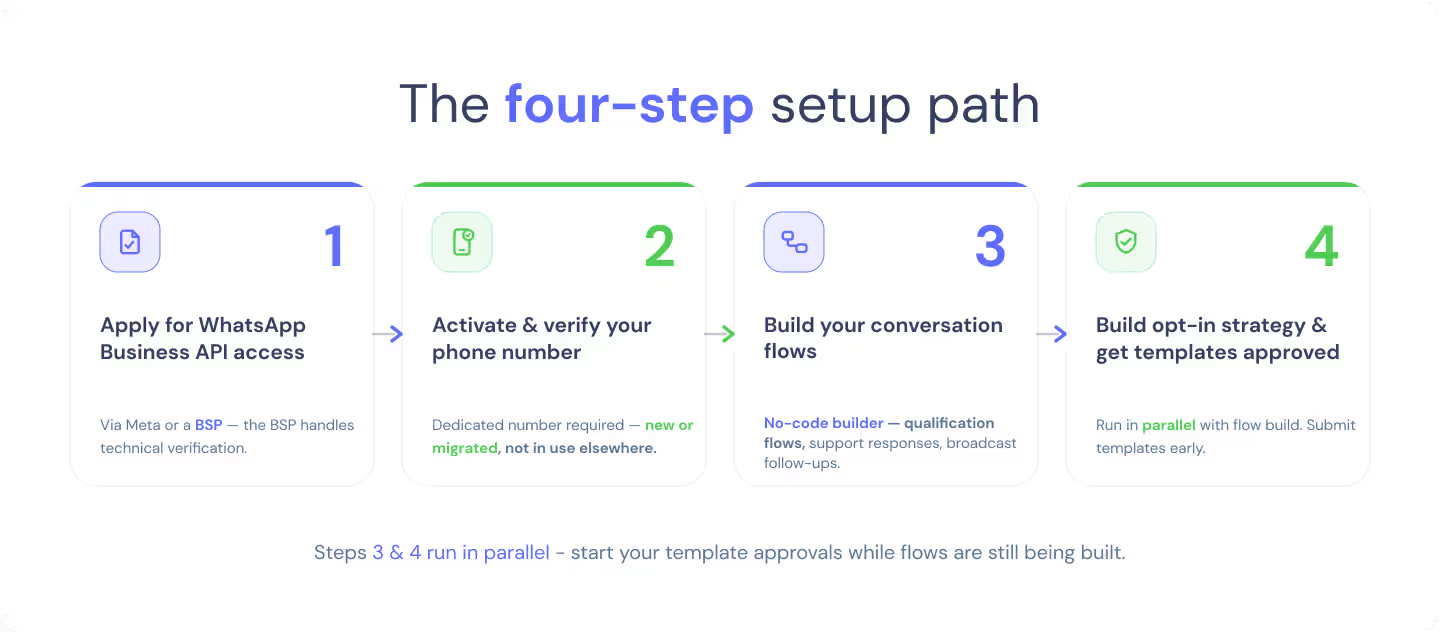
- Apply for WhatsApp Business API access. Apply directly through Meta or via a BSP. The BSP route is easier: the BSP handles the technical verification steps and guides you through business verification. Approval can take anywhere from a few hours to several business days, depending on the account setup.
- Activate and verify your phone number. A dedicated business phone number is required. This can be a new number or a migrated existing one. The number cannot be in active use on any other WhatsApp account
- Build your conversation flows. Use a no-code visual builder to design your automation sequences — qualification flows, support responses, broadcast follow-ups. Connect your knowledge base, define the data fields to collect, and set up CRM or notification integrations.
- Build your opt-in strategy and get templates approved. Run both in parallel with your flow build. Test flows in the platform's WhatsApp testing environment before going live. Submit templates early enough to absorb one rejection cycle.
For a closer look at how the visual builder works — including how to set up conditional logic, connect integrations, and configure an AI agent without writing code — check our no-code chatbot builder guide.
7. How to Choose a WhatsApp Automation Platform
What to evaluate
Most WhatsApp automation platforms connect to the WhatsApp Business API and offer a visual builder. The differences that matter for B2B teams are in depth: can the platform run AI agent flows, not just rule-based scripts? Does it integrate with your CRM natively? Can a non-technical marketing or ops manager build and edit flows independently, without opening a developer ticket?
Five dimensions that separate commodity WhatsApp tools from platforms that support serious automation programmes:
- AI agent capability. Can the platform run a goal-directed AI agent — not just a rule-based bot? This determines whether you can handle unscripted conversations, free-text inputs, and complex qualification flows. Rule-based-only platforms hit a ceiling fast on any use case that involves real conversations.
- No-code depth. Is the builder genuinely usable by a marketing or ops manager without developer involvement? Evaluate: can you build conditional logic, connect a CRM, and configure an AI agent without writing code or opening a ticket? No-code should mean no code — not “less code than before.”
- Native integrations. HubSpot, Salesforce, Google Sheets, Slack — the integrations your team already uses should connect without custom code. Check whether integrations are native (maintained by the platform) or webhook-only (requiring developer configuration).
- Compliance support. Does the platform handle template submission, opt-in management, and opt-out enforcement natively? Platforms that automate the compliance layer reduce your risk surface and remove a task that consistently falls between marketing and legal.
- Analytics and conversation data. Can you see conversation completion rates, drop-off points, template performance, and qualified lead volume without exporting raw data? Native analytics close the loop between automation and optimisation.
The integration trap to avoid
The most common source of failure in WhatsApp automation programmes is choosing a platform that separates conversation design, AI configuration, and CRM integration into different layers. When those layers don't talk to each other natively, you end up patching together a workflow across multiple tools, and every change requires a developer ticket.
The evaluation question to ask before signing any contract: can one non-technical person build a full qualification flow, connect it to your CRM, and configure the AI agent instructions — without touching another tool? If the answer involves a different platform, a separate AI layer, or developer support for the integration, the stated no-code capability is partial, not complete.
Landbot handles all of this in a single visual environment — conversation logic, AI agent configuration, and CRM integration included — so the person running your campaigns can build and iterate without involving engineering.
For integration patterns — how Landbot connects with CRMs, calendars, analytics platforms, and internal tools — check our integrations page!
8. FAQs
FAQs about WhatsApp business automation
WhatsApp business automation is the use of the WhatsApp Business API to send, receive, and respond to messages automatically — through flows, AI agents, and integrations — without a human managing each conversation in real time. It covers everything from simple auto-replies to goal-directed AI agents that qualify leads and resolve support tickets at scale.
Yes. The WhatsApp Business App only supports basic features like away messages and quick replies, with broadcasts capped at 256 contacts per list. Any serious automation — custom flows, AI agents, CRM integrations, and larger campaigns — requires the WhatsApp Business API, accessed through Meta directly or via a Business Solution Provider.
A WhatsApp AI agent is a goal-directed system that pursues an objective — qualifying a lead, resolving a support query, booking an appointment — and adapts when conversations deviate from the expected path. A rule-based WhatsApp chatbot follows a fixed script and hits a dead end when inputs do not match expected options. AI agents handle free text, ambiguous answers, and off-script responses, which makes them suitable for complex, real-world conversations.
Connect a WhatsApp AI agent to your inbound entry points — Click-to-WhatsApp ads, QR codes, or website opt-in flows. The agent runs a qualification sequence, collects the fields your CRM needs (intent, company size, urgency, contact info), scores the lead against your ICP, and routes qualified leads to a booking flow or sales notification. Unqualified leads enter a nurture sequence.
A WhatsApp Message template is a pre-approved message format required for any business-initiated conversation, including re-engaging contacts after a 24-hour window. Meta reviews templates before allowing them to be sent, to ensure compliance with content policies. Approval typically takes 24–72 hours. Templates support personalisation variables (name, order number, etc.) and must be correctly categorised — marketing, utility, or authentication — as this affects per-conversation pricing.
No. WhatsApp requires an active, explicit opt-in: the contact must have consented to receive messages from your business on WhatsApp, with a clear description of what they will receive. Sending to contacts who have not opted in violates WhatsApp's Terms of Service and can result in account suspension. Pre-ticked boxes and implied consent do not meet the required standard.
WhatsApp uses per-message pricing: you are charged for each message delivered to users, not per conversation window. Pricing varies by message category (marketing, utility, authentication, and service) and by country. Service messages are free, as are utility messages sent in response to a user. Marketing messages carry higher rates than utility or authentication messages..
Most B2B and B2C industries are supported, but Meta's Commerce Policy prohibits certain categories: weapons, adult content, gambling, tobacco, alcohol, and specific financial products. Real estate, SaaS, professional services, fintech (with restrictions), healthcare, ecommerce, and hospitality are all approved use cases. Review Meta's Commerce Policy if your business operates in or adjacent to a restricted category before applying.
Core metrics: message open rate (target 70%+), conversation completion rate (percentage of started flows that reach the defined outcome), qualified lead rate (percentage of conversations producing a complete lead object), template quality rating (maintained by Meta, affects send limits), and response rate for campaigns.
Yes. Business Solution Providers like Landbot offer no-code visual builders that let marketing and ops teams design conversation flows, configure AI agents, and connect integrations — including HubSpot, Salesforce, and Google Sheets — without developer involvement.
Landbot is an official Meta BSP — meaning API access, flow building, AI agent configuration, and CRM integration live in a single environment, without stitching together separate tools. That's what makes it a viable option for marketing and ops teams running WhatsApp automation without engineering support.
Automate the one channel people actually open.
Landbot connects to the WhatsApp Business API so you can build AI agents and automation flows without code — and deploy to the channel with 90%+ open rates.
Free plan available
No credit card required
Setup in minutes