
34
Support customers
Post-call voice survey
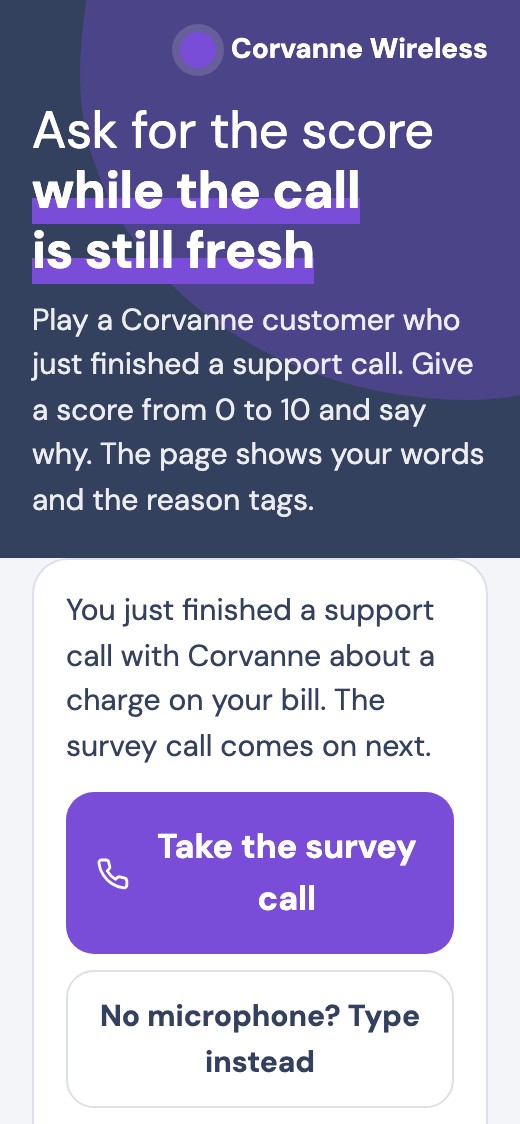
Spoken NPS after a support call, transcribed and tagged by reason.
Post-call voice survey is a free Landbot AI agent template for customer support teams in general. Spoken NPS after a support call, transcribed and tagged by reason. The agent calls after support, asks the score, asks why and tags and saves. More survey responses, tagged by reason.
Voice
English
General
Main goal
Capture feedback right after the call
What you gain
More survey responses, tagged by reason
Conversion agent vs static form
An email survey gets ignored. The agent asks by voice, transcribes and tags the answer
How does this agent work?
Each step is a visible Landbot flow you can open and edit in the builder.
- Under one minute
- Score first, then why
- Transcribed and tagged by reason
- Ends politely when the caller declines
Calls after support
Asks a short question right after the call.
Asks the score
0–10, spoken.
Asks why
An open spoken answer.
Tags and saves
Transcribes and tags the answer by reason.
We set up voice agents with you
Phone numbers, call routing and voice need a short setup call. Book one and we'll build this agent with your team.
Book a call →With Landbot, you can customize everything
Copy the prompt. Your AI assistant builds the agent in Landbot
Support customers
See all

Frequently asked questions
What does the Post-call voice survey template do, and who is it for?
Spoken NPS after a support call, transcribed and tagged by reason. It is built for customer support teams in general whose goal is to capture feedback right after the call. The agent at the top of this page is the real thing: try it before you sign up.
How does the conversation work, step by step?
The visitor goes through 4 steps: Calls after support, Asks the score, Asks why, Tags and saves. Along the way the agent follows a few fixed rules, such as: under one minute. Every step is a visible block on the Landbot canvas, so you can change questions, logic and copy without code.
What results can I expect from this agent?
More survey responses, tagged by reason. It works 24/7, in the moment of intent, and every answer lands in your CRM as a complete record instead of a half-filled form.
Why use a conversion agent instead of a static form here?
An email survey gets ignored. The agent asks by voice, transcribes and tags the answer. If you want proof with your own numbers, run the agent on one page, A/B test it against your current form for two weeks and compare qualified leads in your CRM.
Where can I publish it: website, WhatsApp or both?
On your website as a chat widget, embedded in a page or as a full-page agent, and on WhatsApp with WhatsApp Pro. The flow you build runs on every channel unchanged, so you design it once.
Which CRMs and tools does it connect to?
HubSpot natively, plus Salesforce, Google Sheets and any other tool through webhooks, the API, Zapier or Make. Slack and Calendly connections also work, so the agent can alert your team and book the meeting in the same conversation.
Can I build it with Claude, ChatGPT or another AI assistant?
Yes. Connect the Landbot MCP to Claude, Claude Code, ChatGPT, Codex, Cursor or any assistant with MCP, sign in to Landbot once and paste this template's prompt. Your assistant builds the agent in your account with your brand, and nothing goes live until you publish it.
How much does it cost, and is there a free trial?
Landbot starts at €40/mo (Starter: 500 chats, 100 AI chats, 2 seats) and €100/mo for Pro with HubSpot, webhooks and lead scoring. AI chats are included in every paid plan. Every paid plan starts with a 14-day free trial and no credit card, enough to test this template on a real page.
Do I need a developer to launch it?
No. The template is a no-code flow on a visual canvas: swap in your brand, connect your CRM and publish.
Access 55+ AI agent templates
Get started freeFree plan available · No credit card required · Setup in minutesconversion agents with Landbot
{"@context":"https://schema.org","@graph":[{"@type":"WebPage","@id":"https://landbot.io/ai-agent-templates/post-call-voice-survey","url":"https://landbot.io/ai-agent-templates/post-call-voice-survey","name":"Post-call voice survey","description":"Post-call voice survey is a free Landbot AI agent template for customer support teams in general. Spoken NPS after a support call, transcribed and tagged by reason. The agent calls after support, asks the score, asks why and tags and saves. More survey responses, tagged by reason.","isPartOf":{"@type":"WebSite","name":"Landbot","url":"https://landbot.io"},"breadcrumb":{"@id":"https://landbot.io/ai-agent-templates/post-call-voice-survey#breadcrumb"}},{"@type":"BreadcrumbList","@id":"https://landbot.io/ai-agent-templates/post-call-voice-survey#breadcrumb","itemListElement":[{"@type":"ListItem","position":1,"name":"Home","item":"https://landbot.io/"},{"@type":"ListItem","position":2,"name":"AI agent templates","item":"https://landbot.io/ai-agent-templates"},{"@type":"ListItem","position":3,"name":"Support customers","item":"https://landbot.io/ai-agent-templates?useCase=Support%20customers"},{"@type":"ListItem","position":4,"name":"Post-call voice survey","item":"https://landbot.io/ai-agent-templates/post-call-voice-survey"}]},{"@type":"HowTo","@id":"https://landbot.io/ai-agent-templates/post-call-voice-survey#howto","name":"How the Post-call voice survey agent works","step":[{"@type":"HowToStep","position":1,"name":"Calls after support","text":"Asks a short question right after the call."},{"@type":"HowToStep","position":2,"name":"Asks the score","text":"0–10, spoken."},{"@type":"HowToStep","position":3,"name":"Asks why","text":"An open spoken answer."},{"@type":"HowToStep","position":4,"name":"Tags and saves","text":"Transcribes and tags the answer by reason."}]}]}