LANDBOT FOR CURSOR · MCP SERVER
Describe the agent in Cursor. It builds it in your Landbot account, and Landbot runs it on your website and WhatsApp: qualifying visitors and booking meetings. One click to set up.
First live agent in about 15 minutes
12,000+ teams1B+ conversations since 2015SOC 2 & GDPROne click adds the Landbot MCP server to Cursor. Then just ask.
Or keep going on your phone:
Email me the desktop linkOr follow the steps below.
Or keep going on your phone:
Opens Cursor with the Landbot server pre-filled. Click Install there.
Cursor opens a Landbot sign-in on the first call. Approve it once. No tokens, no API keys.
Open the Agent chat, paste the build prompt or pick one from "Try asking" below. Cursor reads your repo or asks for your website, builds the agent and sends you a test link.
Paste one line into Cursor. Get an agent deployed to test.
Build an agent for my pricing page that qualifies visitors and books a demo with the ones who fit.
CURSOR
Qualifies | Answers pricing questions | Books a demo
Capture company size and budget, then push qualified leads straight into my CRM.
CURSOR
Captures details | Scores the lead | Sends to CRM
Create a WhatsApp agent that answers buying questions and hands the hot leads to sales.
CURSOR
Answers questions | Spots intent | Hands off to sales
The button copies the full prompt, with steps, rules and look, so Cursor builds it right the first time.
Each teammate adds Landbot once and signs in with their own Landbot account, so access follows their Landbot permissions. Share this page with them to get started.
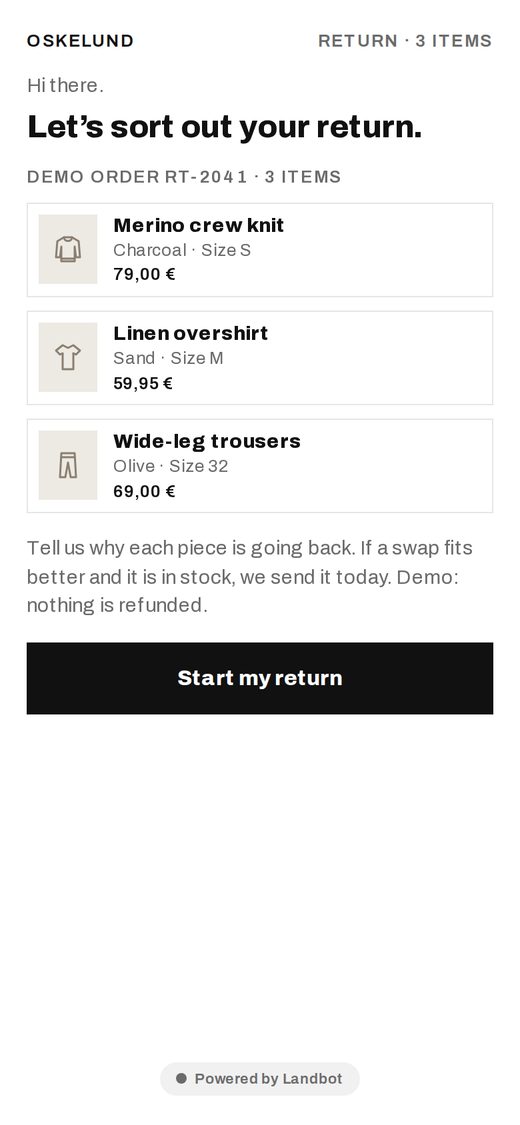 LIVE
LIVEReturns: swap before refund
Offer an exchange before processing a refund.
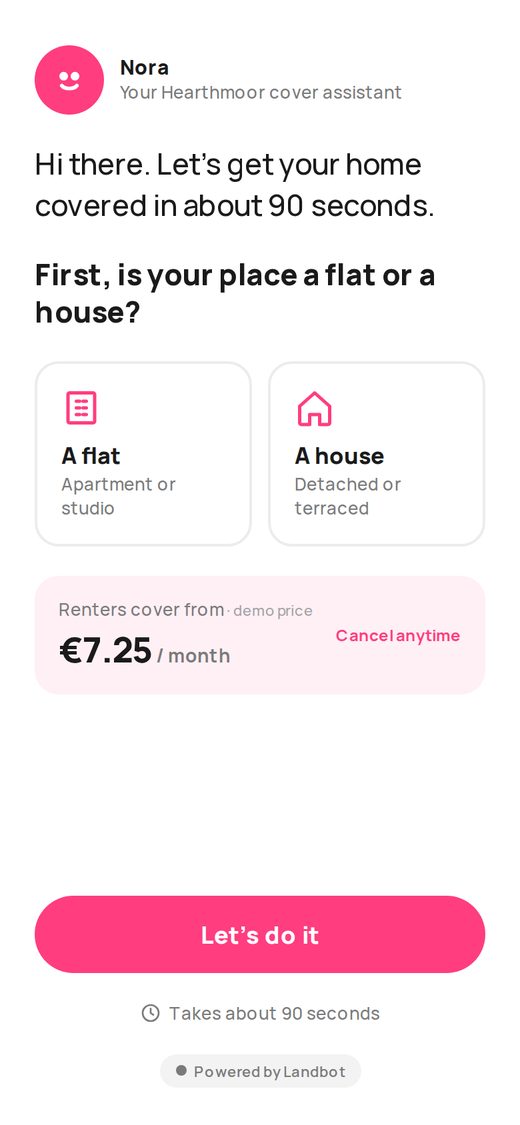 LIVE
LIVEInsurance quote
A 90-second quote flow led by a friendly assistant.
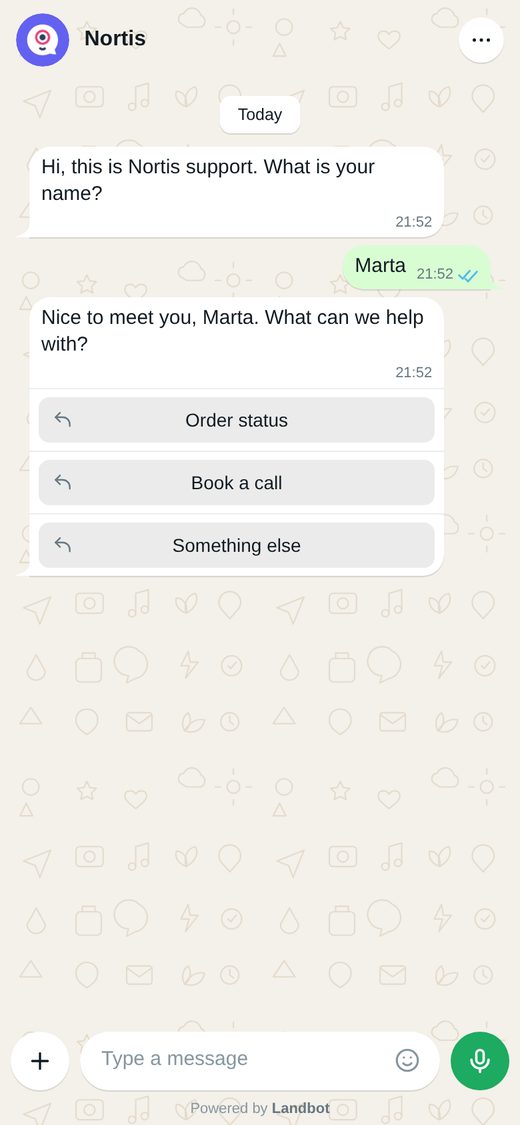 LIVE
LIVEWhatsApp sales assistant
Qualify car buyers by budget inside a familiar WhatsApp-style chat.
What the Landbot server does in Cursor today, and where you take over.
The Landbot MCP server (mcp.landbot.io/mcp) is what Cursor calls to build in Landbot. Once added, Cursor can create, edit, test and publish Landbot AI agents & chatbots in your account from the Agent chat.
Any setup that lets you use Cursor's Agent. Landbot adds no requirements on the Cursor side.
Not yet. They'll come with the Landbot plugin for Cursor. Until then, the build prompts on this page include the steps and rules the skills teach.
No. The Add to Cursor button sets it up in one click.
A free account. The 14-day trial covers everything Cursor uses through the Landbot server.
No. Cursor first creates a test link and publishes only when you say yes.
Yes. Cursor tells you which bot it will change and asks before editing. Every change stays a visible flow you can keep editing in the builder.
Write to us at help@landbot.io and we’ll help you get connected. You can also browse the Help Center or ask the Landbot Community.
Last updated: October 2026
{"copied":"Copied ✓","copyCode":"Copy","soon":"","logo":"cursor","signup":"https://app.landbot.io/signup/","copy":{"build":"Build a Landbot conversion agent for my website.\n\nBefore you start, read this repo to learn my brand, offer and tone. If it isn't my website's code, ask me for my website URL and read it instead.\n\nWhat it is. An agent that greets visitors, works out what they need, qualifies them and books a meeting with the ones who fit.\n\nWhat the visitor goes through\n1. A short greeting in my brand's voice and one question: what brings you here? Three or four tiles based on what my site sells.\n2. Two qualifying questions at most, chosen for my business (for example team size and timeline). Tiles, not free text.\n3. If they fit: offer a meeting and ask for a work email. Validate it.\n4. If they don't fit yet: answer their question from my site's content and offer a useful next step.\n5. Ending: a summary card of what my sales team would receive (need, answers, email, fit).\n\nRules. One question per screen. Never invent prices, features or availability; use only what's on my site. Say \"someone will follow up\" only after the email is asked.\n\nLook and feel. My site's colors, my logo initial in the header, phone first.\n\nWhen it's done, deploy it to test, give me the test link and a one-line summary of each step.","page":"https://landbot.io/build-with-ai/cursor","p0":"Build a Landbot conversion agent for the pricing page of my website.\n\nBefore you start, read this repo to learn my brand, offer and tone. If it isn't my website's code, ask me for my website URL and read it instead.\n\nWhat it is. An agent that answers pricing questions, qualifies the visitor and books a demo with the ones who fit.\n\nWhat the visitor goes through\n1. A short greeting and one question: what brings you to pricing? Tiles: Compare plans, See what it would cost me, Talk to sales.\n2. Two qualifying questions at most (team size and timeline). Tiles, not free text.\n3. Recommend a plan using what's on my site and explain why in one sentence.\n4. If they fit: offer a demo and ask for a work email. Validate it.\n5. Ending: a summary card of what sales would receive (recommended plan, answers, email).\n\nRules. One question per screen. Never invent prices or discounts.\n\nLook and feel. My site's colors, phone first.\n\nUse only facts from my site. When it's done, deploy it to test, give me the test link and a one-line summary of each step.","p1":"Build a Landbot conversion agent for my website that captures and qualifies leads and sends them to my CRM.\n\nBefore you start, read this repo to learn my brand, offer and tone. If it isn't my website's code, ask me for my website URL and read it instead.\n\nWhat it is. An agent that replaces the contact form: it asks only what matters, scores the lead and sends it to the CRM with full context.\n\nWhat the visitor goes through\n1. A short greeting and one question: how can we help? Three tiles based on what my site sells.\n2. Company size: 1–10, 11–50, 51–200, 200+.\n3. Rough budget: four ranges.\n4. Name and work email. Validate the email.\n5. Ending: a summary card with the fields that would reach the CRM and the score (High / Medium / Low).\n\nRules. One question per screen. Score High when the company has more than 50 people and the budget is in the top two ranges. Ask me which CRM I use before connecting it.\n\nLook and feel. My site's colors, phone first.\n\nUse only facts from my site. When it's done, deploy it to test, give me the test link and a one-line summary of each step.","p2":"Build a Landbot conversion agent for WhatsApp for my business.\n\nBefore you start, read this repo to learn my brand, offer and tone. If it isn't my website's code, ask me for my website URL and read it instead.\n\nWhat it is. An agent that answers buying questions from my website's content, spots intent and hands hot leads to a sales rep.\n\nWhat the visitor goes through\n1. Hi, what's your name? Typed reply.\n2. How can we help? Quick replies: I want to buy, I have a question, Something else.\n3. I have a question: answer from my site's content in two sentences at most.\n4. When do you plan to buy? This month, In 3 months, Just browsing.\n5. Hot lead: ask for a phone number and say a rep will message here. Just browsing: keep the chat open with a useful next step.\n\nRules. One question per message. Quick replies except name and phone. Never quote stock or final prices.\n\nLook and feel. WhatsApp-style thread, bubbles and quick replies.\n\nUse only facts from my site. When it's done, deploy it to test, give me the test link and a one-line summary of each step."},"demos":[{"eyebrow":"18 · E-COMMERCE","title":"Returns: swap before refund","desc":"Offer an exchange before processing a refund.","brand":"Oskelund","lang":"English","goal":"Keep revenue by offering an exchange first","gain":"More exchanges, fewer refunds","versus":"A returns form processes the refund. The agent asks why, checks stock and offers the swap before the refund","tint":"#EFEDE9","url":"https://landbot.pro/v3/H-3517953-6FMKHVMZGWEK2LS8/index.html","brief":"Build a Landbot conversion agent from this brief: Returns, swap before refund.\n\nWhat it is. A returns assistant for an online store. The customer starts a return, says why each item is going back, and the agent offers an exchange before the refund whenever a better fit is in stock.\n\nWhat the visitor goes through\n1. \"Let's sort out your return.\" Show the order with each item (name, colour, size, price) and a Start my return button.\n2. For each item: why is it going back? Tiles: Too small, Too big, Not as pictured, Changed my mind, Arrived damaged.\n3. If the reason is size and the other size is in stock: \"Want the {size} instead? We send it today.\" Rows: Swap it (primary), Refund instead.\n4. Damaged: apologise, offer a replacement first, refund second.\n5. Ending: a summary card of what the store would receive (items, reasons, swaps, refunds, total refunded).\n\nRules. One item at a time. Offer the swap only when stock allows; never invent stock or prices. Refund total = sum of refunded items, two decimals.\n\nPromises. \"We send it today\" only on a confirmed swap. Never say a refund is processed.\n\nLook and feel. Clean, light store style, the order as bordered item cards, one strong dark button. Phone first.\n\nBefore you start, ask me for my website URL and read it. Replace the demo brand with mine and use only facts from my site. When it's done, deploy it to test, give me the test link and a one-line summary of each step."},{"eyebrow":"11 · ONBOARDING & FORMS","title":"Insurance quote","desc":"A 90-second quote flow led by a friendly assistant.","brand":"Hearthmoor","lang":"English","goal":"Deliver a quote in under two minutes","gain":"More quotes started and finished","versus":"A form asks every underwriting question. The agent only asks what changes the price and shows the quote as soon as it can","tint":"#FCE6EE","url":"https://landbot.pro/v3/H-3516133-T5KS146P4NKRFXVN/index.html","brief":"Build a Landbot conversion agent from this brief: Insurance quote in 90 seconds.\n\nWhat it is. A friendly assistant that gives a home insurance quote in under two minutes. It asks only what changes the price and shows the quote as soon as it can.\n\nWhat the visitor goes through\n1. \"Hi there. Let's get your home covered in about 90 seconds.\" First, is your place a flat or a house? Two tiles with icons.\n2. Do you rent or own? Two tiles.\n3. Roughly how much are your belongings worth? Four tiles from Under €10k to €50k+.\n4. Show the quote card: monthly price, what's covered, \"Cancel anytime\". Rows: Get this cover, Adjust my answers.\n5. Get this cover: ask for name and email, validate the email.\n6. Ending: a summary card of what the insurer would receive (property, ownership, belongings value, monthly price, email).\n\nRules. One question per screen. A price strip (\"Cover from €X / month\") stays visible from step 2 and updates with each answer. Never ask an underwriting question that doesn't change the price.\n\nPromises. Call it a quote, never a policy. \"Your cover starts\" only in the real service.\n\nLook and feel. Warm and friendly, a named assistant with an avatar, soft pink accents, large tiles. Phone first.\n\nBefore you start, ask me for my website URL and read it. Replace the demo brand with mine and use only facts from my site. When it's done, deploy it to test, give me the test link and a one-line summary of each step."},{"eyebrow":"01 · LEAD GENERATION","title":"WhatsApp sales assistant","desc":"Qualify car buyers by budget inside a familiar WhatsApp-style chat.","brand":"Nortis","lang":"English","goal":"Qualify buyers before sales picks up","gain":"Sales only talks to buyers with a real budget and intent","versus":"A form asks for budget in a dropdown and waits. The agent asks in WhatsApp, reacts to each answer and routes hot leads to a rep on the spot","tint":"#E3F1EA","url":"https://landbot.pro/v3/H-3514728-BX6Q6HCOMGIG6RS3/index.html","brief":"Build a Landbot conversion agent from this brief: WhatsApp sales assistant.\n\nWhat it is. A sales assistant in a familiar WhatsApp-style chat for a car dealer. It qualifies buyers by budget and intent and routes hot leads to a sales rep on the spot.\n\nWhat the visitor goes through\n1. \"Hi, this is {brand} support. What is your name?\" Typed reply.\n2. \"Nice to meet you, {name}. What can we help with?\" Quick replies: Buy a car, Book a test drive, Something else.\n3. Buy a car: What's your budget? Quick replies Under €15k, €15–30k, €30–50k, €50k+. Then: What are you looking for? City car, SUV, Electric, Van.\n4. When do you plan to buy? This month, In 3 months, Just browsing.\n5. Hot lead (this month or in 3 months): ask for a phone number and say a rep will message here. Browsing: send two matching models and keep the chat open.\n6. Ending: a summary card of what sales would receive (name, need, budget, type, timing, priority).\n\nRules. One question per message. Quick replies, not free text, except name and phone. Phone in international format with country code.\n\nPromises. \"A rep will message you\" only after the phone is asked. Never quote stock or final prices.\n\nLook and feel. WhatsApp-style thread: chat wallpaper, white and green bubbles, timestamps, quick-reply buttons under the message. Phone first.\n\nBefore you start, ask me for my website URL and read it. Replace the demo brand with mine and use only facts from my site. When it's done, deploy it to test, give me the test link and a one-line summary of each step."}]}
[{"@context":"https://schema.org","@type":"SoftwareApplication","name":"Landbot for Cursor","applicationCategory":"BusinessApplication","operatingSystem":"Web","url":"https://landbot.io/build-with-ai/cursor","description":"Add the Landbot MCP server to Cursor in one click and build AI agents & chatbots for your website and WhatsApp. Describe the agent; Cursor builds, tests and publishes on your yes.","offers":{"@type":"Offer","price":0,"priceCurrency":"USD"},"publisher":{"@type":"Organization","name":"Landbot","url":"https://landbot.io"}},{"@context":"https://schema.org","@type":"FAQPage","mainEntity":[{"@type":"Question","name":"What is the Landbot MCP server for Cursor?","acceptedAnswer":{"@type":"Answer","text":"The Landbot MCP server (mcp.landbot.io/mcp) is what Cursor calls to build in Landbot. Once added, Cursor can create, edit, test and publish Landbot AI agents & chatbots in your account from the Agent chat."}},{"@type":"Question","name":"Which Cursor plan do I need?","acceptedAnswer":{"@type":"Answer","text":"Any setup that lets you use Cursor's Agent. Landbot adds no requirements on the Cursor side."}},{"@type":"Question","name":"Are the Landbot skills available in Cursor?","acceptedAnswer":{"@type":"Answer","text":"Not yet. They'll come with the Landbot plugin for Cursor. Until then, the build prompts on this page include the steps and rules the skills teach."}},{"@type":"Question","name":"Do I need to edit config files?","acceptedAnswer":{"@type":"Answer","text":"No. The Add to Cursor button sets it up in one click."}},{"@type":"Question","name":"What do I need from Landbot?","acceptedAnswer":{"@type":"Answer","text":"A free account. The 14-day trial covers everything Cursor uses through the Landbot server."}},{"@type":"Question","name":"Will Cursor publish anything without asking?","acceptedAnswer":{"@type":"Answer","text":"No. Cursor first creates a test link and publishes only when you say yes."}},{"@type":"Question","name":"Can Cursor edit bots I already built?","acceptedAnswer":{"@type":"Answer","text":"Yes. Cursor tells you which bot it will change and asks before editing. Every change stays a visible flow you can keep editing in the builder."}},{"@type":"Question","name":"Still have questions about the Landbot MCP?","acceptedAnswer":{"@type":"Answer","text":"Write to us at help@landbot.io and we’ll help you get connected. You can also browse the Help Center or ask the Landbot Community."}}]},{"@context":"https://schema.org","@type":"BreadcrumbList","itemListElement":[{"@type":"ListItem","position":1,"name":"Home","item":"https://landbot.io"},{"@type":"ListItem","position":2,"name":"Build with your AI","item":"https://landbot.io/build-with-ai"},{"@type":"ListItem","position":3,"name":"Cursor","item":"https://landbot.io/build-with-ai/cursor"}]}]
