
15
Book appointments
Property viewing finder
Match listings to filters and book a viewing.
Property viewing finder is a free Landbot AI agent template for sales teams in real estate. Match listings to filters and book a viewing. The agent asks the area, asks budget and bedrooms, shows matches and books a viewing. More viewings booked from the same traffic.
Web
English
Real estate
Main goal
Match renters to listings and book viewings
What you gain
More viewings booked from the same traffic
Conversion agent vs static form
A search form returns a long list. The agent asks for area and budget and books a viewing on the spot
How does this agent work?
Each step is a visible Landbot flow you can open and edit in the builder.
- Filters as chips, not free text
- Match score on every listing
- Viewing slots only for available flats
- Confirmation includes address and time
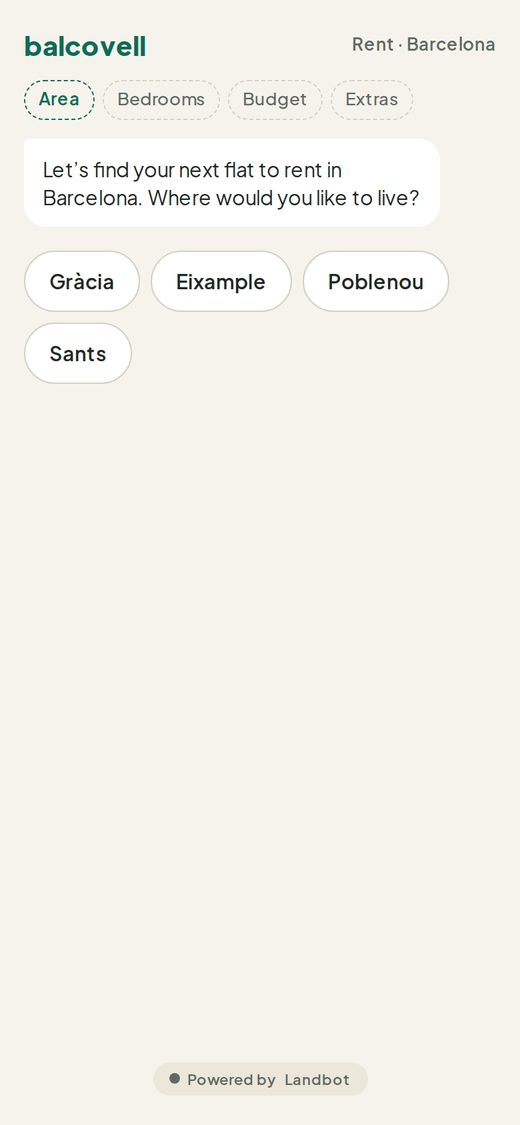
Asks the area
Filter chips for neighbourhoods.
Asks budget and bedrooms
Chips for price range and size.
Shows matches
Listing cards with photo, price and a match score.
Books a viewing
Time-slot buttons for the chosen flat.
Confirms
Viewing details and contact for the agent.
This agent, with your brand, in one paste
Paste the prompt into Claude, ChatGPT, Claude Code or Codex. Your AI connects to Landbot, builds the agent in your account and sends you a link to try it and a link to edit it.
- 1Copy the prompt. It includes the steps to connect Landbot if your AI isn't connected yet.
- 2Paste it in a new chat. Claude, ChatGPT, Claude Code or Codex.
- 3Try your agent. Your AI publishes it and walks you through testing it on your phone with Landbot’s WhatsApp test number.Your AI publishes it and sends you a link to try it in your browser and one to edit it in Landbot.
Property viewing finder
Use the Landbot MCP tools to build my own version of the "Property viewing finder" experience from the Landbot Experience Library, for [your company] ([your website, or "no website"]): Filter chips, listing cards with a match score, book a viewing. Live example (invented brand: Balcovell): https://landbot.pro/v3/H-3517957-9NEVALIKU1YSBJ2D/index.html . Open it and go through it before you build. I want that kind of experience, with its layout and the way a visitor moves through it, not a plain chat with bubbles and buttons. Its look and behaviour come from the bot's Custom CSS and Custom JS, and I'm asking you for both. You can read them in its setup at https://storage.googleapis.com/landbot.pro/v3/H-3517957-9NEVALIKU1YSBJ2D/index.json ("style" is the CSS, "foot" is the script). They were written together for that flow: start from both, keep them in step with the flow you build, and check on the published link that it looks and works like the example. Don't keep the example's brand name, texts or data. Where the example and my description above differ, follow the description. Filter, price and score the options with formulas only. After the results, add "Ask about this one": an AI Agent answering only from that option's details, with exits to book a viewing or back to the list. Use what you already know about me and my business to make it relevant and tailored to us. Use my business name as the header title and browser tab title. If I have a website, take my colours, font and square icon (as the bot avatar) from it; if not, pick colours and a font that suit us. Make sure every text, including button labels, is easy to read (contrast at least 4.5:1). Make sure every step leaves the visitor a next step. When a visitor leaves their contact details, email me at [your email] with what they shared. I'll test it and change it after. If something needs a Landbot plan or add-on I may not have, leave it out, give visitors a simple way to contact me in its place, and tell me what you left out. During this build, create a new bot and never change a bot you didn't create in this conversation. When you hand it back, tell me the bot's ID and confirm it is new. When it's ready, publish it and send me two links: one to try it in my browser and one to edit it in Landbot.
We set up voice agents with you
Phone numbers, call routing and voice need a short setup call. Book one and we'll build this agent with your team.
Book a call →With Landbot, you can customize everything
Copy the prompt. Your AI assistant builds the agent in Landbot
Book appointments
See allFrequently asked questions
What does the Property viewing finder template do, and who is it for?
Match listings to filters and book a viewing. It is built for sales teams in real estate whose goal is to match renters to listings and book viewings. The agent at the top of this page is the real thing: try it before you sign up.
How does the conversation work, step by step?
The visitor goes through 5 steps: Asks the area, Asks budget and bedrooms, Shows matches, Books a viewing, Confirms. Along the way the agent follows a few fixed rules, such as: filters as chips, not free text. Every step is a visible block on the Landbot canvas, so you can change questions, logic and copy without code.
What results can I expect from this agent?
More viewings booked from the same traffic. It works 24/7, in the moment of intent, and every answer lands in your CRM as a complete record instead of a half-filled form.
Why use a conversion agent instead of a static form here?
A search form returns a long list. The agent asks for area and budget and books a viewing on the spot. If you want proof with your own numbers, run the agent on one page, A/B test it against your current form for two weeks and compare qualified leads in your CRM.
Where can I publish it: website, WhatsApp or both?
On your website as a chat widget, embedded in a page or as a full-page agent, and on WhatsApp with WhatsApp Pro. The flow you build runs on every channel unchanged, so you design it once.
Which CRMs and tools does it connect to?
HubSpot natively, plus Salesforce, Google Sheets and any other tool through webhooks, the API, Zapier or Make. Slack and Calendly connections also work, so the agent can alert your team and book the meeting in the same conversation.
Can I build it with Claude, ChatGPT or another AI assistant?
Yes. Connect the Landbot MCP to Claude, Claude Code, ChatGPT, Codex, Cursor or any assistant with MCP, sign in to Landbot once and paste this template's prompt. Your assistant builds the agent in your account with your brand, and nothing goes live until you publish it.
How much does it cost, and is there a free trial?
Landbot starts at €40/mo (Starter: 500 chats, 100 AI chats, 2 seats) and €100/mo for Pro with HubSpot, webhooks and lead scoring. AI chats are included in every paid plan. Every paid plan starts with a 14-day free trial and no credit card, enough to test this template on a real page.
Do I need a developer to launch it?
No. The template is a no-code flow on a visual canvas: swap in your brand, connect your CRM and publish.
Access 55+ AI agent templates
Get started freeFree plan available · No credit card required · Setup in minutesconversion agents with Landbot
{"@context":"https://schema.org","@graph":[{"@type":"WebPage","@id":"https://landbot.io/ai-agent-templates/property-viewing-finder","url":"https://landbot.io/ai-agent-templates/property-viewing-finder","name":"Property viewing finder","description":"Property viewing finder is a free Landbot AI agent template for sales teams in real estate. Match listings to filters and book a viewing. The agent asks the area, asks budget and bedrooms, shows matches and books a viewing. More viewings booked from the same traffic.","isPartOf":{"@type":"WebSite","name":"Landbot","url":"https://landbot.io"},"breadcrumb":{"@id":"https://landbot.io/ai-agent-templates/property-viewing-finder#breadcrumb"}},{"@type":"BreadcrumbList","@id":"https://landbot.io/ai-agent-templates/property-viewing-finder#breadcrumb","itemListElement":[{"@type":"ListItem","position":1,"name":"Home","item":"https://landbot.io/"},{"@type":"ListItem","position":2,"name":"AI agent templates","item":"https://landbot.io/ai-agent-templates"},{"@type":"ListItem","position":3,"name":"Book appointments","item":"https://landbot.io/ai-agent-templates?useCase=Book%20appointments"},{"@type":"ListItem","position":4,"name":"Property viewing finder","item":"https://landbot.io/ai-agent-templates/property-viewing-finder"}]},{"@type":"HowTo","@id":"https://landbot.io/ai-agent-templates/property-viewing-finder#howto","name":"How the Property viewing finder agent works","step":[{"@type":"HowToStep","position":1,"name":"Asks the area","text":"Filter chips for neighbourhoods."},{"@type":"HowToStep","position":2,"name":"Asks budget and bedrooms","text":"Chips for price range and size."},{"@type":"HowToStep","position":3,"name":"Shows matches","text":"Listing cards with photo, price and a match score."},{"@type":"HowToStep","position":4,"name":"Books a viewing","text":"Time-slot buttons for the chosen flat."},{"@type":"HowToStep","position":5,"name":"Confirms","text":"Viewing details and contact for the agent."}]}]}